获取图像深度估计的方法有一般来说有两种。第一种是通过使用深度摄像头来进行深度估计;第二种是使用立体图像来进行深度估计,这个只需要普通摄像头即可。
深度摄像头(比如:微软的Kinect)将传统的摄像头和一个红外传感器相结合来辅助摄像头区分相似物体,并计算它们与摄像头之间的距离,是极少数在捕获图像时能估计物体和摄像头间距离的设备。
使用普通摄像头,在不同视图下拍摄两幅图像(注意:两幅图像时是相距物体相同距离拍摄的),通过几何学中的对极几何概念,其属于立体视觉(stereo vision)几何学,可从同一物体的两张不同图像中提取三维信息。
关于对极几何的概念,建议跳转阅读这篇博文:《对极几何基本概念》。
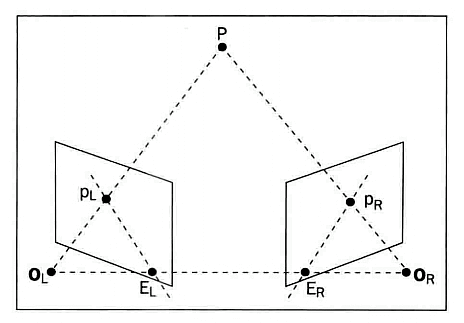
简略来说:
其跟踪从摄像头到物体上每个物体的虚线,然后在第二张图像中做同样的操作,并根据同一物体对应的线的交叉来计算距离。
1. 安装contrib库:
(1)打开终端,采用如下命令安装最新contrib:****
pip3 install opencv-contrib-python
(2)查看安装的版本:
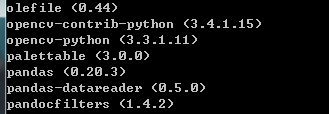
注:****实际使用中发现,不同版本的opencv及python会对应不同的名称的API接口,因此极有可能会出现不兼容的问题。
为了方便讲解和测试,本文及之后的文章会统一版本如下:
python3.5 + opencv-python3.3.1 + opencv-contrib-python3.4.1 + Spyder3.2.1
2. 实现深度估计的两种算法
2.1 StereoSGBM()实现
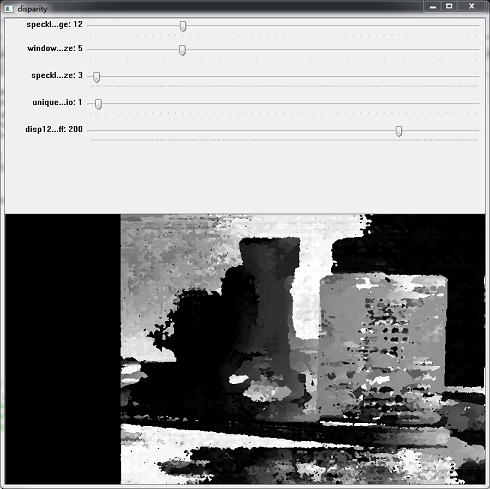
读取两张不同视图的图像,创建一个StereoSGBM实例,并通过几个跟踪条来调整参数,使用update()函数将新参数传递给StereoSGBM实例,最后调用compute()方法计算视差图。
import numpy as np
import cv2

def update(val = 0):
    stereo.setBlockSize(cv2.getTrackbarPos('window_size', 'disparity'))
    stereo.setUniquenessRatio(cv2.getTrackbarPos('uniquenessRatio', 'disparity'))
    stereo.setSpeckleWindowSize(cv2.getTrackbarPos('speckleWindowSize', 'disparity'))
    stereo.setSpeckleRange(cv2.getTrackbarPos('speckleRange', 'disparity'))
    stereo.setDisp12MaxDiff(cv2.getTrackbarPos('disp12MaxDiff', 'disparity'))

    print ('computing disparity...')
    disp = stereo.compute(imgL, imgR).astype(np.float32) / 16.0

    cv2.imshow('left', imgL)
    cv2.imshow('right', imgR)
    cv2.imshow('disparity', (disp-min_disp)/num_disp)

if __name__ == "__main__":
    window_size = 5
    min_disp = 16
    num_disp = 192-min_disp
    blockSize = window_size
    uniquenessRatio = 1
    speckleRange = 12
    speckleWindowSize = 3
    disp12MaxDiff = 200
    P1 = 600
    P2 = 2400

    imgL = cv2.imread('depth1.jpg')
    imgR = cv2.imread('depth2.jpg')

    cv2.namedWindow('disparity')
    cv2.createTrackbar('speckleRange', 'disparity', speckleRange, 50, update)
    cv2.createTrackbar('window_size', 'disparity', window_size, 21, update)
    cv2.createTrackbar('speckleWindowSize', 'disparity', speckleWindowSize, 200, update)
    cv2.createTrackbar('uniquenessRatio', 'disparity', uniquenessRatio, 50, update)
    cv2.createTrackbar('disp12MaxDiff', 'disparity', disp12MaxDiff, 250, update)

    '''
    cv2.createStereoSGBM(minDisparity, numDisparities, blockSize[, P1[, P2[, disp12MaxDiff[, preFilterCap[, uniquenessRatio[, speckleWindowSize[, speckleRange[, mode]]]]]]]]) → retval
    Parameters:
        minDisparity – Minimum possible disparity value. Normally, it is zero but sometimes rectification algorithms can shift images, so this parameter needs to be adjusted accordingly.
        numDisparities – Maximum disparity minus minimum disparity. The value is always greater than zero. In the current implementation, this parameter must be divisible by 16.
        blockSize – Matched block size. It must be an odd number >=1 . Normally, it should be somewhere in the 3..11 range.
        P1 – The first parameter controlling the disparity smoothness. See below.
        P2 – The second parameter controlling the disparity smoothness. The larger the values are, the smoother the disparity is. P1 is the penalty on the disparity change by plus or minus 1 between neighbor pixels. P2 is the penalty on the disparity change by more than 1 between neighbor pixels. The algorithm requires P2 > P1 . See stereo_match.cpp sample where some reasonably good P1 and P2 values are shown (like 8*number_of_image_channels*SADWindowSize*SADWindowSize and 32*number_of_image_channels*SADWindowSize*SADWindowSize , respectively).
        disp12MaxDiff – Maximum allowed difference (in integer pixel units) in the left-right disparity check. Set it to a non-positive value to disable the check.
        preFilterCap – Truncation value for the prefiltered image pixels. The algorithm first computes x-derivative at each pixel and clips its value by [-preFilterCap, preFilterCap] interval. The result values are passed to the Birchfield-Tomasi pixel cost function.
        uniquenessRatio – Margin in percentage by which the best (minimum) computed cost function value should “win” the second best value to consider the found match correct. Normally, a value within the 5-15 range is good enough.
        speckleWindowSize – Maximum size of smooth disparity regions to consider their noise speckles and invalidate. Set it to 0 to disable speckle filtering. Otherwise, set it somewhere in the 50-200 range.
        speckleRange – Maximum disparity variation within each connected component. If you do speckle filtering, set the parameter to a positive value, it will be implicitly multiplied by 16. Normally, 1 or 2 is good enough.
        mode – Set it to StereoSGBM::MODE_HH to run the full-scale two-pass dynamic programming algorithm. It will consume O(W*H*numDisparities) bytes, which is large for 640x480 stereo and huge for HD-size pictures. By default, it is set to false .
    '''

    stereo = cv2.StereoSGBM_create(
        minDisparity = min_disp,
        numDisparities = num_disp,
        blockSize = window_size,
        uniquenessRatio = uniquenessRatio,
        speckleRange = speckleRange,
        speckleWindowSize = speckleWindowSize,
        disp12MaxDiff = disp12MaxDiff,
        P1 = P1,
        P2 = P2
    )
    update()
    cv2.waitKey(0)
    cv2.destroyAllWindows()
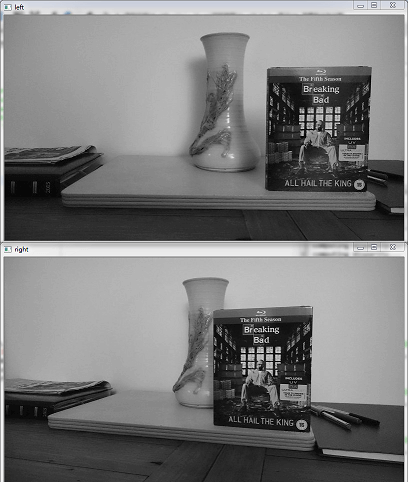
原始左右视图:
深度估计效果图:
2.2 StereoBM()实现
import numpy as np
import cv2

imgL = cv2.imread('stacked1.png',0)
imgR = cv2.imread('stacked2.png',0)

cv2.imshow('imgL', imgL)
cv2.imshow('imgR', imgR)

stereo = cv2.StereoBM_create(numDisparities=16, blockSize=17)
disparity = stereo.compute(imgL, imgR)
disparity = cv2.normalize(disparity, disparity, alpha=0, beta=255, norm_type=cv2.NORM_MINMAX, dtype=cv2.CV_8U)

cv2.imshow('disparity', disparity)
cv2.waitKey(0)
cv2.destroyAllWindows()
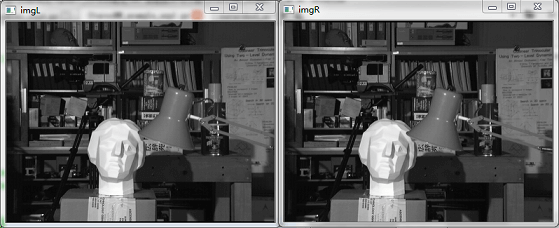
原始左右视图:
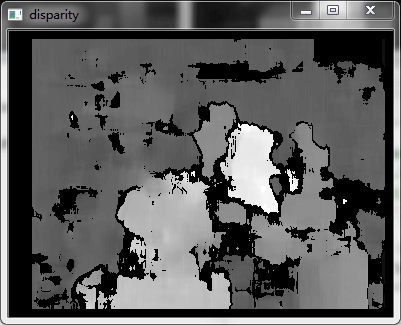
深度估计效果图:
评论 (0)
暂无评论,快来抢沙发吧!